
avatar
Siz Long

My name is Siz. I am a computer science graduate student specializing in backend development with Golang and Python, seeking opportunities in innovative tech projects. My personal website is longsizhuo.com .Connect with me on LinkedIn: https://www.linkedin.com/in/longsizhuo/.

  • Resume
  • Archives
  • Categories
  • Photos
  • Music


{{ date }}

{{ time }}

avatar
Siz Long

My name is Siz. I am a computer science graduate student specializing in backend development with Golang and Python, seeking opportunities in innovative tech projects. My personal website is longsizhuo.com .Connect with me on LinkedIn: https://www.linkedin.com/in/longsizhuo/.

  • 主页
  • Resume
  • Archives
  • Categories
  • Photos
  • Music

2131. 连接两字母单词得到的最长回文串

  2025-05-25
字数统计: 681字   |   阅读时长: 3min

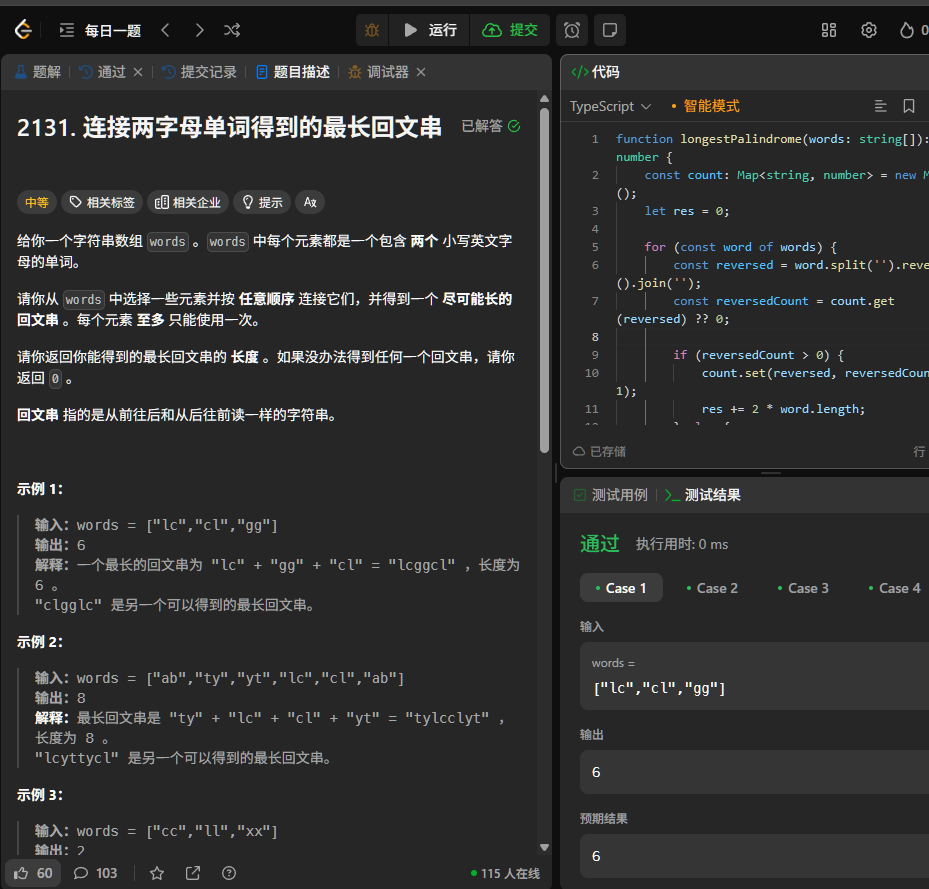
QUESTION:

img_7.png
2131. 连接两字母单词得到的最长回文串.md

My Think:

The idea comes from the brilliant Ling-nc.

We build a hash map to count the occurrences of each word.

For each word, we check whether its reverse exists in the hash map.
If it does, they can form a palindrome pair—we update the result and decrease the corresponding count.
If the reverse does not exist, we increment the count for the current word.
Finally, we check if there’s any palindromic word that can be used as the center of the palindrome.

Example:

  1. Input: [“lc”, “cl”, “gg”, “gg”]

  2. “lc” has no pair → stored in the map: { “lc”: 1 }

  3. “cl” finds “lc” exists → use “lc” + “cl” as a pair → res += 4 → map updated to { “lc”: 0 }

  4. “gg” has no pair → stored in the map: { “lc”: 0, “gg”: 1 }

  5. Second “gg” finds “gg” exists → use “gg” + “gg” as a pair → res += 4 → map becomes { “lc”: 0, “gg”: 0 }

    Then we check whether the hash map contains any palindromic word (i.e., a word with two identical characters) that can be used as the center of the final palindrome string.
    If such a word exists, we can add 2 more to the result.

  6. Finding a center word (can only pick one symmetric word)
    ⚠️ In this example, all “gg” words have been paired, so none is left → no center word is added.

思路来自ling-nc大佬. 构建哈希表,统计每个单词的出现次数。

对于每个单词,检查其逆序是否存在于哈希表中,如果存在,则可以形成一个回文串,更新结果并减少对应的计数。
如果逆序不存在,则将该单词的计数增加。最后检查是否有可以作为中心的回文单词。
举例:

  1. 输入 [“lc”, “cl”, “gg”, “gg”]

  2. “lc” 没有配对 → 存入 map: { “lc”: 1 }

  3. “cl” 发现 “lc” 存在 → 成对使用 “lc”+”cl” → res += 4 → map 更新为 { “lc”: 0 }

  4. “gg” 没有配对 → 存入 map: { “lc”: 0, “gg”: 1 }

  5. 第二个 “gg” 发现 “gg” 存在 → 成对使用 “gg”+”gg” → res += 4 → map: { “lc”: 0, “gg”: 0 }
    接着检查哈希表中是否有可以作为中心的回文单词(即两个字母相同的单词),如果有,则可以增加2到结果中。

  6. 第二部分:寻找中间部分(只能选一个对称字符串)
    ⚠️ 在这个例子中,”gg” 都被配完了,没剩下 → 不会加中间部分。

Code:

1
2
3
4
5
6
7
8
9
10
11
12
13
14
15
16
17
from collections import defaultdict
from typing import List
class Solution:
def longestPalindrome(self, words: List[str]) -> int:
count = defaultdict(int)
res = 0
for word in words:
if count[word[::-1]] > 0:
count[word[::-1]] -= 1
res += 4
else:
count[word] += 1
for key, value in count.items():
if key[0] == key[1] and value > 0:
res += 2
break
return res
1
2
3
4
5
6
7
8
9
10
11
12
13
14
15
16
17
18
19
20
21
22
23
24
25
function longestPalindrome(words: string[]): number {
const count: Map<string, number> = new Map();
let res = 0;

for (const word of words) {
const reversed = word.split('').reverse().join('');
const reversedCount = count.get(reversed) ?? 0;

if (reversedCount > 0) {
count.set(reversed, reversedCount - 1);
res += 2 * word.length;
} else {
count.set(word, (count.get(word) ?? 0) + 1);
}
}

for (const [word, freq] of count.entries()) {
if (word === word.split('').reverse().join('') && freq > 0) {
res += word.length;
break; // 只能选一个居中的回文串
}
}

return res;
}
  • Python
  • Answer

show all >>

42

  2025-03-27
字数统计: 1k字   |   阅读时长: 5min

QUESTION:

42.md

My Think:

滚瓜烂熟的一道题, 全部靠背诵. 但是昨天又理解了一下, 画了一个GIF图供我自己理解, 代码如下,

图片举例: [0,1,0,2,1,0,1,3,2,1,2,1]
该题的核心思想其实就是木桶原理, 我们将最外面的两个柱子视作玛丽亚之墙, 这个时候我们忽略玛丽亚之墙内部的城墙, 那么最多是不是可以装min(leftmax, rightmax)这么高的水呢?
也就是最短的柱子的水决定了它的”高度”. 但是我们想知道最多能装多少水, 还需要一个宽度. 于是这个时候我们就一根一根柱子看, 也就是说我们计算每”1”个宽度能装多少水, 然后加起来即可.
我们的左指针为left, 右指针为right, 我们再维护一个左边最高和右边最高.
当我们到达最外面的玛丽亚之墙的时候, 左最高即为leftmax, 右最高即为rightmax, 这个时候我们是无法判断可以装多少水的.
一直到leftmost!=rightmost的时候, 我们就可以判断了.
img_6.png
比如这一帧, 我们最多能装的是leftmax的水量, 即2, 但是因为我们这个时候左指针所在的柱子有一定高度1, 所以是2-1=1, 也就是我们能装1的水.
如果我们比较的不是leftmost和rightmost, 而是leftmax和rightmax, 我们就无法确定说这一个柱子为什么能够兜得住水, 它之所以能兜住水,必然是<=leftmax的

This is a problem I’ve memorized inside out — totally muscle memory. But I revisited it yesterday and tried to actually understand it. I even made a GIF to help myself visualize what’s happening. Here’s the code:

Let’s use the example: [0,1,0,2,1,0,1,3,2,1,2,1]

The core idea of this problem is basically the “bucket theory”:
We treat the two outermost bars as the “Walls of Maria” — and ignore the inner ones for now.
If that’s the case, then the max height of water we can hold is min(leftmax, rightmax).
In other words, the shorter wall decides the water level.

But height alone isn’t enough — we also need width to compute the actual amount of water.
So we look at each bar one by one, and calculate how much water we can trap on top of it, then sum it all up.

We use two pointers: left and right, and also keep track of the highest wall on the left (leftmax) and the highest wall on the right (rightmax).

When our pointer reaches the end of the string (or the two walls meet), that means we’ve gone through all the characters — that’s when we know we have a valid answer.

Take this specific frame as an example:
img_6.png

At this point, the max water we can hold is leftmax = 2, but the current column has height 1, so we can trap:

2 - 1 = 1 unit of water.

If we were comparing leftmax and rightmax directly, we wouldn’t know why this particular column can hold water. The only reason it can trap water is because its height is less than or equal to leftmax.

Code:

1
2
3
4
5
6
7
8
9
10
11
12
13
14
class Solution:
def trap(self, height: list[int]) -> int:
ans = leftmost = rightmost = 0
left, right = 0, len(height) - 1
while left < right:
leftmost = max(leftmost, height[left])
rightmost = max(rightmost, height[right])
if leftmost <= rightmost:
ans += leftmost - height[left]
left += 1
else:
ans += rightmost - height[right]
right -= 1
return ans
1
2
3
4
5
6
7
8
9
10
11
12
13
14
15
16
17
18
19
20
21
22
23
24
25
26
27
28
29
30
31
32
33
34
35
36
37
38
39
40
41
42
43
44
45
46
47
48
49
50
51
52
import matplotlib.pyplot as plt
import matplotlib.animation as animation
import numpy as np

# Given height list for illustration
height = [0,1,0,2,1,0,1,3,2,1,2,1]

# Initialize variables as in the function
left, right = 0, len(height) - 1
leftmax = rightmax = 0
ans = 0

# For animation, store each frame's water level and pointers
frames = []

# Simulate the logic and capture frames
while left < right:
leftmax = max(leftmax, height[left])
rightmax = max(rightmax, height[right])
water = [0] * len(height)
if leftmax <= rightmax:
trapped = max(0, leftmax - height[left])
ans += trapped
water[left] = trapped
frames.append((height.copy(), water.copy(), left, right))
left += 1
else:
trapped = max(0, rightmax - height[right])
ans += trapped
water[right] = trapped
frames.append((height.copy(), water.copy(), left, right))
right -= 1

# Create animation
fig, ax = plt.subplots(figsize=(10, 5))

def update(frame):
ax.clear()
heights, water, l_ptr, r_ptr = frame
indices = np.arange(len(heights))
ax.bar(indices, heights, color='grey', edgecolor='black')
ax.bar(indices, water, bottom=heights, color='blue', edgecolor='blue', alpha=0.6)
ax.axvline(l_ptr, color='green', linestyle='--', label='Left Pointer')
ax.axvline(r_ptr, color='red', linestyle='--', label='Right Pointer')
ax.set_ylim(0, max(height) + 3)
ax.set_title("Trapping Rain Water Animation")
ax.legend()

ani = animation.FuncAnimation(fig, update, frames=frames, interval=500, repeat=False)

from IPython.display import HTML
ani.save("trapping_rain_water.gif", writer="pillow", fps=2) # 保存为 GIF
  • Python
  • Answer

show all >>

93. Restore IP Addresses

  2025-03-25
字数统计: 500字   |   阅读时长: 2min

QUESTION:

93. Restore IP Addresses

My Think:

This MiHoYo coding test question is very similar to LeetCode 46 (Permutations), and both rely on the backtracking approach.

As shown in the code, during the first traversal, we may get something like ['2', '5', '5', '2'] as our initial parts, but at this point, we haven’t traversed the entire string yet.

When we enter the next level of DFS, the pointer moves forward by +length, so it effectively moves to the far right of the current segment.
If the pointer has reached the end of the string, it means we’ve visited all characters — in this case, we’ve found one valid answer and can add it to the result list.

One important note: parts + [part] is pass-by-value, not by reference like in LeetCode 46.
This means we don’t need to manually undo changes (i.e., no need to backtrack with pop()), because each recursive call creates a new list.

现在在做的是MiHoyo的笔试题, 这个和46.permutation非常相似, 都是回溯思想.

如代码所示, 在第一遍遍历中, 我们会得到['2','5','5','2'] 作为第一个parts, 但是我们并没有遍历完整个字符串.

这个时候如果我们进入新的dfs的时候, 我们的指针因为刚刚+length, 所以我们实际上
指到的是最右边,所以当当前指针已经指到最右边的时候, 说明我们遍历完了所有字符, 那么这就是答案之一.

parts + [part] 是值传递而不是46的引用传递, 所以不用手动撤销更改

Code:

1
2
3
4
5
6
7
8
9
10
11
12
13
14
15
16
17
18
19
20
21
22
23
24
25
26
27
28
29
from typing import List

class Solution:
def restoreIpAddresses(self, s: str) -> List[str]:
res = []

def backtrack(start: int, parts: List[str]):
# 终止条件:正好4段且用完所有字符
# Stop condition: exactly 4 segments and all characters used up
if len(parts) == 4:
if start == len(s):
res.append(".".join(parts))
return

for length in range(1, 4): # 每段长度1~3 Each segment length 1~3
if start + length > len(s):
break
part = s[start:start+length]

# 前导0非法,但0本身合法
# Leading 0 is illegal, but 0 itself is legal
if len(part) > 1 and part[0] == '0':
continue

if int(part) <= 255:
backtrack(start + length, parts + [part]) # 注意用 + 避免污染 We need to use + to avoid pollution

backtrack(0, [])
return res
  • Python
  • Answer

show all >>

9021_TUT_3_25T1

  2025-03-07
字数统计: 2.2k字   |   阅读时长: 13min

Exercise 1

Problem Description:

You are given two integers, m and n, where:

  • m represents the number of repeated units (patterns).
  • n represents the number of elements (underscores) within each unit.

The goal is to generate a string where:

  • Each unit contains n underscores (_), separated by |.
  • These units are then concatenated together, separated by *.

My Solution:

1
2
3
4
5
def generate_struct(n):
return '|'.join(n * ['_'])

def f1(m, n):
return ' * '.join(m * [generate_struct(n)])

My Thought Process:

I think of each unit as a separate structure. So, I decompose the problem by breaking down the smallest unit, which is the structure made of underscores joined by |.
After constructing each unit, I use join() to combine them together using *.

Helper Function generate_struct(n):

This function generates the basic structure.
It creates a list of underscores (_) of length n and joins them with |.
Example: If n = 2, the result will be “_|_“.

Standard Solution:

1
2
def f1(m, n):
return ' * '.join('|'.join('_' for _ in range(n)) for _ in range(m))

Concise Expression:

The inner join creates a string of n underscores joined by | using a generator expression ('_' for _ in range(n)).
The outer join repeats this process m times and concatenates the units using *.

In summary, my solution focuses on modularity by breaking down the problem into smaller parts (like creating a structural unit), whereas the standard solution compresses everything into one line using list comprehensions.

Exercise 2

Problem Description:

The goal is to generate a pattern based on the digits of a given number n. Specifically:

If a digit is odd, it should be represented by a black square (⬛).
If a digit is even, it should be represented by a white square (⬜).
The program takes a number n as input and prints a string of squares corresponding to the digits of n.

My Solution:

1
2
3
4
5
6
7
8
def f2(n):
ans = ''
for i in str(n):
if int(i) % 2 == 0:
ans += '⬜'
else:
ans += '⬛'
print(ans)

My Thought Process:

  1. Loop through each digit:
    Convert the number n to a string to iterate over each digit individually.

  2. Check if the digit is even or odd:
    Convert each digit back to an integer and use the modulus operator (% 2) to check if the digit is even or odd.

  3. Append the corresponding square:

    • If the digit is even, append a white square (⬜) to the result string.
    • If the digit is odd, append a black square (⬛).
  4. Print the final string:
    After processing all the digits, print the final string containing black and white squares.

Standard Solution:

1
2
def f2(n):
print(''.join({0: '\u2b1c', 1: '\u2b1b'}[int(d) % 2] for d in str(n)))

Dr.Martin’s solution is:

  1. More compact and Pythonic.
  2. Uses a dictionary and list comprehension for brevity and efficiency.
  3. The Unicode characters for the squares are referenced directly using their escape sequences (\u2b1c for white, \u2b1b for black).

Exercise 3

Problem Description:

In this task, the number n is treated as a number expressed in different bases (ranging from 2 to 10), and we aim to convert it into its corresponding base 10 value for each of these bases, where the conversion is valid.

For n = 2143:

  • 2143 in base 5 is equivalent to 298 in base 10.
  • 2143 in base 6 is equivalent to 495 in base 10.
  • And so on.

The goal is to iterate over different base systems from 2 to 10, treat the input number n as if it is expressed in each base, and then convert it to base 10.

My Solution:

1
2
3
4
5
6
7
8
def f3(n: int):
for i in range(2, 11):
try:
# Treat n as a number in base i and convert it to base 10
value = int(str(n), i)
print(f'{n} is {value} in base {i}')
except ValueError:
pass

My Thought Process:

  1. Iterating over Bases (2 to 10):

    • We loop through the base values i ranging from 2 to 10.
  2. Conversion Using int():

    • For each base i, we treat the number n as a number in that base. To do this, we first convert n to a string (str(n)) and then use int() to interpret it as a base i number.
    • If the digits of n are valid for base i, this conversion succeeds, and the result is the base 10 equivalent of n.
    • If the digits of n are not valid for base i (for example, if base 2 is used and n contains digits greater than 1), a ValueError is raised, and we skip the invalid base.
  3. Handling Errors with try-except:

    • The try-except block ensures that invalid bases are skipped, allowing us to handle cases where the digits in n are not valid for a particular base.

Standard Solution:

1
2
3
4
5
def f3(n):
n_as_string = str(n)
min_base = max(2, max({int(d) for d in n_as_string}) + 1)
for b in range(min_base, 11):
print(f'{n} is {int(n_as_string, b)} in base {b}')

It skips the bases where the digits in n are not valid, and it uses a set comprehension to extract the unique digits from n_as_string. The maximum digit is then used to determine the minimum base to start iterating from.

Exercise 4

Problem Description:

The task is to create a function f4(n, base) that returns a dictionary D, where:

Keys are integers from 0 to n.
Values are tuples that represent the base base representation of each key, converted from base 10.

My Solution:

1
2
3
4
5
6
7
8
9
10
11
12
13
14
def convert_to_base(n, base):
if n == 0:
return '0'
digits = []
while n:
digits.append(str(n % base))
n //= base
return ''.join(digits[::-1])

def f4(n: int, base: int):
D = {}
for i in range(0, n + 1):
D[i] = tuple(map(int, convert_to_base(i, base)))
return D

My Thought Process:

  1. Helper Function convert_to_base(n, base):

    • This function converts a number n from base 10 to the specified base.
    • We use a while loop to repeatedly take the modulus (n % base) and append the remainder to the list digits.
    • We then divide n by base (n //= base) to reduce it for the next iteration.
    • After collecting all digits, we reverse the list and return it as a string.
  2. Main Function f4(n, base):
    We initialize an empty dictionary D.
    For each number i from 0 to n, we convert i to the given base using convert_to_base().
    The converted base digits are then mapped to integers and stored in a tuple as the value for each key i in the dictionary.

Explanation of Why map() is not Pythonic:

In the function f4, the use of map(int, convert_to_base(i, base)) applies the int function
to each element of the result from convert_to_base, effectively converting each character to an integer.

However, it’s worth noting that the map() function, which originates from functional programming,
has largely been superseded by more Pythonic constructs such as list comprehensions.

These comprehensions are generally considered superior for several reasons:

  • They are more elegant and concise.
  • They tend to be shorter in terms of syntax, making the code easier to read.
  • They are easier to understand for most people, especially those who are more familiar with Python’s
    standard syntax rather than functional programming constructs.
  • In many cases, they are also more efficient in terms of performance.

For example, instead of using map(int, ...), the same functionality could be achieved with a
list comprehension, like so:

D[i] = tuple([int(digit) for digit in convert_to_base(i, base)])

This list comprehension achieves the same result but follows a more modern Pythonic style.

Standard Solution:

1
2
3
4
5
6
7
8
9
10
def f4(n, base):
D = {0: (0,)}
for m in range(1, n + 1):
digits = []
p = m
while p:
digits.append(p % base)
p //= base
D[m] = tuple(reversed(digits))
return D

Both solutions are valid and achieve the same result. My approach uses a helper function for base conversion, which adds modularity,
whereas the standard solution is more concise and directly integrates the conversion logic into the main function.

Exercise 5

At the first, try to run this:

1
print(0.1 + 0.2)

What happened? The result is not 0.3, but 0.30000000000000004. Why?

Problem Description:

The approach we are using in this exercise is designed to expose the limitations of floating-point arithmetic in computers. Let’s break down why this approach leads to precision inaccuracies and why other methods might not reveal these issues as clearly.

This problem can seem complex, and it’s designed to highlight the subtleties of floating-point arithmetic. Let’s walk through the logic using the test cases to figure out what the function does.

Key Concepts:

  • Floating-point numbers: Computers store floating-point numbers using a binary format, which often introduces precision errors.
  • Precision: We’re working with two types of precision in this function—simple precision (same as the length of the fractional part) and double precision (twice that length).

Solution:

1
2
3
4
5
6
7
8
9
10
11
12
13
14
15
16
17
18
19
20
21
22
23
24
25
26
27
28
29
def f5(integral_part, fractional_part):
# Calculate the number of digits in the fractional part
precision = len(str(fractional_part))

# Concatenate the integral and fractional parts as strings, then convert to a float
a_float = float(str(integral_part) + '.' + str(fractional_part))

# Format the float with precision equal to the number of digits in the fractional part (simple precision)
simple_precision = f'{a_float:.{precision}f}'

# Append a number of zeros equal to the fractional part length to the simple precision value (extended precision)
extended_simple_precision = simple_precision + '0' * precision

# Format the float with precision equal to twice the number of fractional digits (double precision)
double_precision = f'{a_float:.{precision * 2}f}'

# Print the first part of the output
print('With', precision * 2, 'digits after the decimal point, ', end='')

# Compare if extended precision and double precision values are the same
if extended_simple_precision == double_precision:
# If they are the same, it means the float is precise and has trailing zeros
print(simple_precision, 'prints out with', precision, 'trailing',
precision == 1 and 'zero,' or 'zeroes,', 'namely, as',
extended_simple_precision
)
else:
# If not, there is a precision error, and no trailing zeros
print(simple_precision, 'prints out as', double_precision)

Our function attempts to check and display this floating point error with simple precision (simple_precision) and double precision (double_precision). The error becomes more obvious when we represent floating point numbers with higher precision (double the number of decimal places). So in this way, we show that floating point numbers are not always actually stored as we expect them to be with more precise representation.

Exercise 6

Problem Description:

In this task, we are given:

  • A list L, which contains multiple sub-lists of integers, and all sub-lists have the same length n.
  • A list fields, which is a permutation of {1, ..., n}.

We are required to sort the list L by using a multi-key sorting mechanism, where:

  • First, the elements in L are sorted based on the position given by the first element of fields.
  • If two sub-lists are equal based on the first field, we move to the second field, and so on.
  • Finally, if required, the sorting proceeds up to the last field in fields.

Example of Fields Explanation:

If fields = [2, 1], it means:

  1. First, sort based on the second element of each sublist.
  2. If there are ties (same values in the second position), sort based on the first element.

My Solution:

1
2
def f6(L, fields):
return sorted(L, key=lambda x: [x[i-1] for i in fields])
  1. Sorting with sorted():
    The sorted() function is used to sort the list L.
    The key parameter defines how the sorting will be performed.

  2. Lambda Function:
    The lambda function defines how the sublists will be sorted. It generates a list of values for each sublist based on the positions specified in fields.
    For example, if fields = [2, 1], the lambda function will extract the second and first elements from each sublist in that order, and sorting will be done based on this new list.

  3. Key Structure:
    The key is a list of elements from each sublist, indexed by the positions specified in fields. We use x[i - 1] because fields is 1-based, and list indexing in Python is 0-based.

  4. What is Lambda Function?

For example:

We have:

1
f = lambda x: x * x

This is equivalent to:

1
2
def f(x):
return x * x

And lambda function in a sorted function is used to define a custom sorting key.

1
2
3
4
5
L = [(1,2), (3,1), (5,0)]

SortedL = sorted(L, key=lambda x: x[1])

print(SortedL)

The result is: [(5, 0), (3, 1), (1, 2)], it sorts the list based on the second element of each tuple.

Standard Solution:

1
2
def f6(L, fields):
return sorted(L, key=lambda x: tuple(x[i - 1] for i in fields))

Why Use a Tuple?:

  • Tuples are often preferred for multi-key sorting because they are immutable, and Python’s built-in sorting functions can efficiently compare tuples.
  • Each sublist is transformed into a tuple of its elements based on the order defined by fields. The sorted() function then uses these tuples to sort the list.
  • 9021
  • lab

show all >>

9021_TUT_2_25T1

  2025-02-03
字数统计: 2.8k字   |   阅读时长: 17min

Exercise 1:

This exercise focuses on input validation and formatting floating-point numbers. The goal is to prompt the user to enter a floating-point number between -1 and 1 (exclusive). If the input is valid, the program rounds the number to two decimal places and prints it. Otherwise, it keeps prompting the user until a valid input is provided.
Key Points:

  • The program uses a try-except block to catch invalid inputs (e.g., strings that cannot be converted to floats).
  • The input() function is wrapped in an infinite while loop to continuously ask for input until the correct condition is met.

In the updated version of Exercise 1, we use the formatting :.2f instead of round(). Here’s the key difference between the two:

  • round(): This is a Python built-in function that rounds a number to a specified number of decimal places. For example, round(1.236, 2) will return 1.24. However, the output of round() is still a float, but it does not guarantee a fixed number of decimal places when printed. For instance, round(1.0001, 2) would return 1.0 and only display one decimal place, not two.
  • :.2f: This is part of Python’s string formatting and ensures the number is displayed with exactly two decimal places, no matter what the number is. It also rounds the number appropriately. For instance, number = 1.0 formatted as f”{number:.2f}” will print 1.00. This makes :.2f particularly useful for consistent display of decimal places, which is important for formatting output for users.

My Solution

1
2
3
4
5
6
7
8
9
10
11
12
13
14
while True:
try:
i = input('Enter a floating point number between -1 and 1 excluded: ')
number = float(i)
if '.' not in i:
raise ValueError
if -1 < number < 1:
# not using round() here because it rounds to the nearest even number
print(f'\nUp to +/-0.005, you input {number:.2f}')
else:
raise ValueError
break
except ValueError:
print("You got that wrong, try again!\n")

Standard Solution

1
2
3
4
5
6
7
8
9
10
11
12
while True:
try:
x = input('Enter a floating point number between -1 and 1 excluded: ')
if '.' not in x:
raise ValueError
x = float(x)
if not (-1 < x < 1):
raise ValueError
break
except ValueError:
print('You got that wrong, try again!\n')
print(f'\nUp to +/-0.005, you input {x:.2f}')

Exercise 2:

This exercise involves processing a block of text and formatting it into sentences. Each sentence should have its first word capitalized, and the remaining words should be in lowercase. The task is to handle spaces and punctuation properly.

In other words: Modify the sentence to conform to English grammar

Standard Solution

  1. Split text into a list of words.
  2. Iterate through the words and apply the following rules:
    • If the word is the first word of the sentence (i.e., the first word or follows a sentence-ending punctuation mark), capitalize it.
    • If the word is not the first word of the sentence, make it lowercase.
1
2
3
4
5
6
7
def f2(text):
words = text.split()
for i in range(len(words)):
# Ternary Expression
words[i] = words[i].title() if i == 0 or words[i - 1][-1] in '.!?'\
else words[i].lower()
return ' '.join(words)

Key Points:

  • A regular expression (re.sub) is used to replace multiple spaces with a single space.
  • Another regular expression (re.split) is used to split the text into sentences while preserving punctuation marks.
  • After splitting, the sentences are processed: the first word is capitalized, and all other words are made lowercase.
  • Finally, the processed sentences are recombined into a single formatted text.

Why use re in Exercise 2, and what is re?

In Exercise 2, we use re (Python’s regular expression module) to process and format the text input. Let’s break down why re is used and what it is:

What is re?

re stands for regular expressions, which are powerful tools for matching patterns in strings. The re module in Python allows you to work with regular expressions to search, split, and manipulate text based on specific patterns. Regular expressions are highly flexible and efficient for handling complex string operations.

Why use re in Exercise 2?

In this exercise, we need to handle several complex text manipulations:

  1. Replace multiple spaces with a single space: Sentences in the text may have irregular spaces between words, so we need to normalize these spaces. Instead of writing loops or conditions to handle each case, we use re.sub() with a pattern r’\s+’ to easily match all occurrences of one or more spaces and replace them with a single space.
  2. Split sentences while preserving punctuation: We need to split the text into individual sentences, where each sentence is followed by punctuation (e.g., ‘.’, ‘!’, or ‘?’). The function re.split(r’([.!?])’, text) allows us to split the text based on punctuation while keeping the punctuation marks, which is crucial for proper sentence reconstruction.

Regular expressions allow us to:

  • Efficiently match patterns like spaces or punctuation.
  • Perform complex text transformations with minimal code.
  • Handle edge cases that would otherwise require more manual handling.
1
2
3
4
5
6
7
8
9
10
11
12
13
14
15
16
17
18
19
20
21
22
23
24
25
26
27
28
29
30
31
32
33
34
35
# Assume that the argument text is a string that denotes a text,
# defined as one or more sentences, two successive
# sentences being separated by at least one space,
# the first sentence being possibly preceded with spaces,
# the last sentence being possibly followed by spaces,
# a sentence being defined as at least two words,
# two successive words in a sentence being separated by
# at least one space, a word being defined as a sequence
# of (uppercase or lowercase) letters,
# - possibly followed by a comma for a word that is
# not the last one in its sentence,
# - definitely followed by a full stop, an exclamation mark
# or a question mark for a word that is the last one
# in its sentence.
import re


def f2(text):
# Use regular expression to replace multiple spaces with a single space
text = re.sub(r'\s+', ' ', text.strip())

# Correct way to split sentences while preserving delimiters
sentences = re.split(r'([.!?])', text)

# Process sentences and punctuation separately
new_text = []
i = 0
while i < len(sentences)-1:
sentence = sentences[i].strip()
if sentence:
sentence =' '.join(sentence.capitalize().split())
# Rebuild the sentence and add back the punctuation
new_text.append(sentence +sentences[i +1])
i += 2
return ' '.join(new_text)

Exercise 3:

This exercise works with lists of integers and aims to repeatedly remove the first and last elements of the list as long as they are equal. The list is treated as a double-ended queue (deque) for efficient removal of elements from both ends.

Key Points:

  • The deque data structure is used because it provides O(1) operations for popping elements from both ends, which is more efficient than using lists.
  • The program checks if the first and last elements of the deque are equal and removes them until this condition is no longer met.
  • The deque is converted back to a list before being returned.

Why is deque more efficient than list in Exercise 3?

In Exercise 3, we are frequently removing elements from both the front (left) and the back (right) of the list. This is where using a deque (double-ended queue) from Python’s collections module becomes more efficient compared to using a standard list.

Here’s why:

  • List Behavior: When you use a standard list and call list.pop(0) to remove the first (leftmost) element, it requires shifting all the remaining elements one position to the left. This shift operation takes linear time—O(n), where n is the number of elements in the list. This means that for every removal from the front, the larger the list, the slower the operation becomes.

    • Removing from the right side of a list using list.pop() is an O(1) operation (constant time) because no elements need to be shifted, making it efficient only when working from the end of the list.
  • Deque Behavior: A deque (double-ended queue) is specifically designed to support efficient append and pop operations from both ends. In a deque, both popleft() and pop() operations take constant time—O(1)—because the deque is implemented as a doubly linked list. This means no elements need to be shifted when popping from the left or right.

    • In Exercise 3, where we need to frequently remove elements from both ends of the list, using a deque ensures that both the removal from the left (popleft()) and the right (pop()) are performed in constant time. This makes the entire process much more efficient, especially for large lists where repeated operations would slow down if we used a standard list.

What is a deque?

A deque (short for “double-ended queue”) is a data structure that allows for fast appending and popping of elements from both ends. It is part of the collections module in Python and is optimized for scenarios where you need to efficiently add or remove elements from both ends of the sequence.

Key Features of deque:

  • O(1) time complexity for operations on both ends (append, pop, appendleft, popleft).
  • It is implemented as a doubly linked list, meaning each element contains a reference to both the previous and next elements, allowing efficient traversal in both directions.
  • deque is ideal for scenarios where you need frequent and efficient insertions and removals from both the front and back of a sequence, unlike a standard list where such operations are costly at the front.

Standard Solution:

1
2
3
4
5
6
7
def f3(L):
# Remove the list as long as it has at least two elements and the first and last elements are equal
while len(L) > 1 and L[0] == L[-1]:
L.pop(0) # Remove the first element
L.pop(-1) # Remove the last element
return L

My Solution:

1
2
3
4
5
6
7
8
9
from collections import deque

def f3(L):
L = deque(L) # Convert the list to a deque for efficient popping from both ends
# Continue removing elements while there are at least two elements and the first and last are equal
while len(L) > 1 and L[0] == L[-1]:
L.popleft() # Efficiently remove the first element (O(1) operation)
L.pop() # Efficiently remove the last element (O(1) operation)
return list(L) # Convert the deque back to a list and return it

Exercise 4:

This exercise deals with lists of integers that are in increasing order. The goal is to remove any element whose value is equal to its index in the list. The program iterates over the list and removes such elements, ensuring the index is correctly adjusted after each removal.

Key Points:

  • The program uses a while loop and checks if the element at index i is equal to i. If true, it removes the element and does not increment i, so that the next element at the same position is checked.
  • The remove() function is used to delete the element, which is appropriate for this task.
  • Care is taken to ensure that index adjustments are handled correctly.

The reason we use remove() instead of pop(0) or popleft() in a deque is that we need to specifically remove the value that matches the number we reached. pop() and popleft() remove elements by position, without considering the value, which isn’t suitable for our case.

Standard Solution:

1
2
3
4
5
6
7
8
def f4(L):
i = 0
while i < len(L):
if L[i] == i:
L.pop(i)
else:
i += 1
return L

My Solution:

1
2
3
4
5
6
7
8
def f4(L):
i = 0
while i < len(L):
if L[i] == i:
L.remove(L[i]) # Using remove() here since popleft() removes from the left only
else:
i += 1 # Only increment i if no element was removed
return L

Exercise 5:

This exercise works with a circular list of integers. The task is to identify elements that are both larger than one of their adjacent elements and smaller than the other. The result is returned as a dictionary where each key is such an element, and its value is a pair of the adjacent elements (one smaller and one larger).

Key Points:

  • The list is treated as circular, meaning the first element is considered adjacent to the last element.
  • The program iterates through the list, compares each element with its neighbors, and stores those that meet the criteria.
  • For each valid element, the adjacent smaller and larger elements are stored in a dictionary.

To solve this problem, we need to create a dictionary D where each key is an element in the list L that satisfies a certain condition, and the value is a tuple of two elements. The first element of this tuple is the adjacent element that is smaller than the current key, and the second element is the adjacent element that is larger than the current key.

Steps:

  1. Loop structure: Check each element.
  2. Processing of adjacent elements: Since the list is cyclic, the previous element of the first element is the last element, and the next element of the last element is the first element.
  3. Condition check: Find the adjacent elements that are smaller and larger than the current element, and add them to the result dictionary.

Standard Solution:

1
2
3
4
5
6
7
8
9
10
11
12
13
14
def f5(L):
D = {}
for i in range(len(L)):
m = L[i - 1]
L[i]
# Treat it as a head-tail circular array
n = L[(i + 1) % len(L)]
# we don't care about the order of m and n [0,1,2,4] L[3%4==3]
if n < m:
m, n = n, m
# If L[i] is between m and n, store it in the dictionary:
if m < L[i] < n:
D[L[i]] = m, n
return D

L[i-1] help us to get the previous element of the current element, 0 - 1 is len(L) - 1.
and L[(i+1) % len(L)] help us to get the next element of the current element. The modulo operation (i+1) % len(L) ensures that the index wraps around to the beginning of the list when it reaches the end.

Exercise 6:

This exercise deals with factorizing an integer n into the form 2^k * m, where m is an odd number. If n is negative, the program adds a negative sign to the output. If n is zero, it prints a special message.

1
2
3
4
5
6
7
8
9
10
11
def f6(n):
if not n:
print('0 = 2^k * 0 for all integers k!')
return
k = 0
m = n
sign = '-' if n < 0 else ''
while m % 2 == 0:
m //= 2
k += 1
print(f'{n} = {sign}2^{k} * {abs(m)}')
  • If n is negative, it keeps track of the sign.
  • It repeatedly divides n by 2 while it remains even (n % 2 == 0), counting how many times this happens (k).
  • The remaining number, m, must be odd, because we divide out all possible factors of 2.
  • Finally, it prints the equation:
    "n = sign * 2^k * m"

FOR VERY VERY VERY VERY VERY BIG NUMBER:

When dealing with very large integers, the method of continuously dividing the number by 2 to factor out powers of 2 (2^k) can become inefficient. This is because each division can be costly in terms of computational time, especially for very large numbers with millions or billions of digits. Each division involves recalculating the entire integer, which is slow for large integers.
Using Bit Manipulation:

A much more efficient approach is to use bit manipulation to determine how many times a number can be divided by 2 (i.e., how many factors of 2 it has). This method avoids division altogether and instead directly analyzes the binary representation of the number to count the number of trailing zeros, which correspond to the powers of 2 in the factorization.

Why?

  1. Bitwise operations are much faster than arithmetic operations like division, especially for large integers. Counting the trailing zeros in a number’s binary representation can be done in constant time.

  2. Extracting the lowest set bit of a number allows us to quickly find how many times a number can be divided by 2 without having to repeatedly divide the number. This provides the power of 2 (k) directly.

1
2
3
4
5
6
7
8
9
10
11
12
13
14
15
16
17
def f6(n):
if n == 0:
print("0 = 2^k * 0 for all integers k!")
return

# Handle negative sign
sign = '-' if n < 0 else ''
n = abs(n)

# Using bit manipulation to count how many trailing zeros (powers of 2)
k = (n & -n).bit_length() - 1 # Count trailing zeros by isolating the lowest set bit

# Remove 2^k factor from n
m = n >> k # Equivalent to n // 2^k, shifting right by k bits

# Print the result
print(f"{sign}{n} = {sign}2^{k} * {m}")
  • Python
  • Answer

show all >>

2270. Number of Ways to Split Array

  2025-01-14
字数统计: 134字   |   阅读时长: 1min

QUESTION:

2270. Number of Ways to Split Array.md

My Think:

2 <= nums.length <= 105, 因此我们可以直接获取到第一个数字, 初始状态就在指针于index0, 正要往index1走的时候.
然后只需要一次For循环就可以搞定

重点是第二个方法, 来自题解.

Code:

1
2
3
4
5
6
7
8
9
10
11
class Solution:
def waysToSplitArray(self, nums: List[int]) -> int:
temp_sum = nums[0]
total_sum = sum(nums) - temp_sum
ans = 0
for i in range(1, len(nums)):
if temp_sum >= total_sum:
ans += 1
temp_sum += nums[i]
total_sum -= nums[i]
return ans
1
2
t = (sum(nums) + 1) // 2
return sum(s >= t for s in accumulate(nums[:-1]))
  • Python
  • Answer

show all >>

post-gu

  2025-01-09
字数统计: 654字   |   阅读时长: 4min

Notes on RSA and Diffie-Hellman

1. Mathematical Background of RSA and Diffie-Hellman

RSA

  • Prime Factorization: The problem of integer factorization.
  • Diffie-Hellman: The discrete logarithm problem.

Let:

$$
s \in \mathbb{Z}_n^2, a_i \in \mathbb{Z}_2^n, e_i \in \mathbb{Z}^n
$$

Define:

$$
a_i \cdot s + e_i
$$

as a certain encryption form.

For example:

$$
\mathbb{Z}_n^2 = {7, 11, 13, 15, 17, 19, 23, 27, 31}
$$


2. RSA Algorithm Steps

  1. Choose two prime numbers:

    $$
    p = 3, q = 11
    $$

    Then:

    $$
    n = p \cdot q = 3 \cdot 11 = 33
    $$

    $$
    \phi(n) = (p-1)(q-1) = 2 \cdot 10 = 20
    $$

    (Computing the number of integers coprime to ( n ))

    • Since ( p, q ) are primes, for all ( a \in \mathbb{Z}^+ ), if ( a < p ), then ( \gcd(a, p) = 1 ), where ( p ) is a prime.
    • There are ( (p-1) ) and ( (q-1) ) numbers coprime to ( pq ).
    • The total count of numbers up to ( n ) is ( n = p \cdot q ), and ( n ) is divisible by ( q ) and ( p ).
    • The total count of numbers not coprime to ( n ) is ( p + q - 1 ).
    • Therefore, ( \phi(n) = n - (q + p - 1) = pq - q - p + 1 = (p-1)(q-1) ).
  2. Choose a public key ( e ):

    $$
    1 < e < \phi(n), , \text{and} , \gcd(e, \phi(n)) = 1
    $$

    For example:

    $$
    e = 7
    $$

  3. Compute the private key ( d ):

    $$
    d \cdot e \equiv 1 , (\text{mod} , \phi(n))
    $$

    Solving:

    $$
    d = 3
    $$

  4. Public-private key pair:

    • Public key: ( (e, n) = (7, 33) )
    • Private key: ( (d, n) = (3, 33) )

3. Encryption and Decryption Process

  • Suppose the plaintext is ( m = 4 ), the ciphertext ( c ) is:

    $$
    c = m^e , \text{mod} , n
    $$

    Calculation:

    $$
    c = 4^7 , \text{mod} , 33 = 16
    $$

  • Decrypting to retrieve ( m ):

    $$
    m = c^d , \text{mod} , n
    $$

    Calculation:

    $$
    m = 16^3 , \text{mod} , 33 = 4
    $$


4. Proof of Correctness of Decryption

The encryption and decryption rely on the following equation:

$$
e \cdot d \equiv 1 ,(\text{mod}, \phi(n))
$$

Thus, we have:

$$
e \cdot d = 1 + k \cdot \phi(n)
$$

  1. From the encryption formula:

    $$
    c = m^e ,(\text{mod}, n)
    $$

  2. Using the decryption formula:

    $$
    m = c^d ,(\text{mod}, n)
    $$

  3. Substituting ( c ) from the encryption equation:

    $$
    m = (m^e)^d ,(\text{mod}, n)
    $$

  4. Consolidating the exponent:

    $$
    m = m^{e \cdot d} ,(\text{mod}, n)
    $$

  5. Since ( e \cdot d = 1 + k \cdot \phi(n) ):

    $$
    m = m^{1 + k \cdot \phi(n)} ,(\text{mod}, n)
    $$

  6. Applying Euler’s theorem:

    $$
    m^{\phi(n)} \equiv 1 ,(\text{mod}, n)
    $$

  7. Simplifying:

    $$
    m^{1 + k \cdot \phi(n)} \equiv m^1 \cdot (m^{\phi(n)})^k ,(\text{mod}, n)
    $$

  8. Since ( m^{\phi(n)} \equiv 1 ):

    $$
    m^{1 + k \cdot \phi(n)} \equiv m ,(\text{mod}, n)
    $$

Thus, decryption is correct.


LWD:
$$
\left{ \left(a_i, \langle a_i, s \rangle + e_i \right) : s \gets \mathbb{Z}_q^n, a_i \gets \mathbb{Z}q^n, e_i \gets \chi \right}{i=1}^m
$$

  1. ( \mathbb{Z} = \mathbb{Z}/q \mathbb{Z} ) represents a finite ring modulo ( q ).
  2. ( \chi ) is a probability distribution over ( \mathbb{Z} ), used to generate “small numbers” (noise).
  • Uniform Distribution: ( \chi ) randomly generates integer values from the range [−B, B] (e.g., [−5,5]), where ( B \ll q/2 ).
    The assumption ( B \ll q/2 ) ensures that the noise ( e_i ) does not obscure the modulated result during decryption.
  • Discrete Gaussian Distribution: Another common distribution, denoted as ( D_{\mathbb{Z}, \sigma} ), with standard deviation ( \sigma ), used to generate near-zero random noise values.

( a \gets D ): a is randomly sampled (or generated) from probability distribution D.
( a \gets S ): When S is a finite set, a is randomly and uniformly selected from S.

( a_i \in \mathbb{Z}_q^n ): This denotes an ( n )-dimensional vector space modulo ( q ), where each component belongs to ( \mathbb{Z}_q ).

  • Python
  • Answerhe

show all >>

2241. Design an ATM Machine

  2025-01-06
字数统计: 1.1k字   |   阅读时长: 5min

QUESTION:

2241. Design an ATM Machine.md
There is an ATM machine that stores banknotes of 5 denominations: 20, 50, 100, 200, and 500 dollars. Initially the ATM is empty. The user can use the machine to deposit or withdraw any amount of money.

When withdrawing, the machine prioritizes using banknotes of larger values.

For example, if you want to withdraw $300 and there are 2 $50 banknotes, 1 $100 banknote, and 1 $200 banknote, then the machine will use the $100 and $200 banknotes.
However, if you try to withdraw $600 and there are 3 $200 banknotes and 1 $500 banknote, then the withdraw request will be rejected because the machine will first try to use the $500 banknote and then be unable to use banknotes to complete the remaining $100. Note that the machine is not allowed to use the $200 banknotes instead of the $500 banknote.
Implement the ATM class:

ATM() Initializes the ATM object.
void deposit(int[] banknotesCount) Deposits new banknotes in the order $20, $50, $100, $200, and $500.
int[] withdraw(int amount) Returns an array of length 5 of the number of banknotes that will be handed to the user in the order $20, $50, $100, $200, and $500, and update the number of banknotes in the ATM after withdrawing. Returns [-1] if it is not possible (do not withdraw any banknotes in this case).

My Think:

The purpose of this question is to simulate an ATM machine, which returns the amount of money you withdraw, no more and no less. I am greedy, because the second sentence “There are 3 $200 bills and 1 $500 bill in the machine, so the withdrawal request will be rejected”
This shows that we can skip thinking about the knapsack problem in complex dynamic programming and directly consider simple greed.

Because the denominations of the deposited money are only 20, 50, 100, 200, 500, we can store them in the list in advance and wait for traversal.

Then we create a defaultdict() to create a hash table for each denomination in the ATM machine.

deposit() creates a reverse traversal dictionary. Because we need to traverse the dictionary from large denominations to small denominations, the reverse dictionary is very convenient at this time.

Assuming the initial amount is 600, the first denomination traversed is 500, It fits the logic of the question very well

For the withdraw() function, I created a temporary dictionary deep copy storage so that the initial array will not be changed when [-1] is returned. Otherwise, it will be troublesome to backtrack.

Here, Sylvia and I used two different traversal methods. She traversed the list of denominations, while I traversed the dictionary directly (actually traversed the key directly).

  1. If the current denomination (600) is greater than the current denomination (500), then try to deduct it. If the bank money is withdrawn directly, then look at the next denomination.

  2. If it is not withdrawn, then amount deducts the deductible share and then continues to look at the next denomination.

  3. If there is still amount left at the end, return [-1], otherwise calculate how many bills have been consumed in total, which is the answer.

这道题的目的是模拟一台ATM机器, 让你取多少钱, 就返回多少钱, 不能多也不能少. 我是贪心的思想, 因为第二句”机器里有 3 张 $200 的钞票和1 张 $500 的钞票,那么取款请求会被拒绝”
这就说明我们可以跳过思考复杂的动态规划中的背包问题, 而直接考虑简单的贪心.

因为存的钱的面额只有20, 50, 100, 200, 500 这五种面额, 于是我们提前存在列表里面等待遍历即可.
然后我们创建一个defaultdict(), 为ATM机器里面的每种面额创建哈希表.

deposit()创建了一个反向遍历的字典. 因为我们需要从大面额到小面额遍历字典, 在这个时候反向的字典就很方便.

假设初始`amount`为`600`, 遍历到的第一个面额就是`500`, 就很符合题目的逻辑

withdraw()函数, 我之所以创建了一个临时字典深拷贝储存是在返回[-1]的情况下不更改初始数组. 否则还要回溯挺麻烦的.

这里我和Sylvia用了两种不同的遍历方式, 她遍历了面额的列表, 而我是直接遍历的字典(实际上直接遍历的key).

  1. 如果当前面额(600)大于了当前面额(500), 那就尝试扣除, 如果直接把银行钱取完了, 那再看下一个面值.
  2. 如果没有取完, 那么amount扣除掉能扣除的份额, 再继续看下一个面额即可.
  3. 到最后amount还有剩余则返回[-1], 否则计算一共消耗了多少张钞票, 即是答案了.

Code:

1
2
3
4
5
6
7
8
9
10
11
12
13
14
15
16
17
18
19
20
21
22
23
24
25
26
27
28
29
30
31
32
33
34
35
36
37
38
39
40
41
42
import copy
from typing import List

from collections import defaultdict


class ATM:

def __init__(self):
self.sd = defaultdict(int)
self.amount = ['20', '50', '100', '200', '500']

def deposit(self, banknotesCount: List[int]) -> None:
for i in range(len(banknotesCount) - 1, -1, -1):
self.sd[self.amount[i]] += banknotesCount[i]


def withdraw(self, amount: int) -> List[int]:
tempSd = copy.deepcopy(self.sd)
# key = 面值, value = 张数
for key, value in tempSd.items():
if amount >= int(key) and value > 0:
# 需要多少张钞票
howManyPiece = amount // int(key)
if howManyPiece >= value:
# 全部取出来
tempSd[key] = 0
amount -= value * int(key)
else:
# 取出这么多钞票
tempSd[key] -= howManyPiece
amount -= int(key) * howManyPiece
else:
if amount > 0:
return [-1]
else:
ans = []
for i in self.sd.keys():
ans.append(self.sd[i] - tempSd[i])
self.sd = copy.deepcopy(tempSd)
return ans[::-1]
  • Python
  • Answer

show all >>

9021_TUT_9

  2024-11-11
字数统计: 3.2k字   |   阅读时长: 19min

My solution didn’t think about the hidden test cases seriously, please refer to the standard solution.

Exercise 1

The doctest module in Python is a tool for testing code by comparing the output of code snippets written in a program’s docstrings to expected results. It allows developers to write simple test cases as part of their documentation and automatically validate that code behaves as documented.

This exercise requires interpreting a pattern where each argument in vertical_bars() represents the number of asterisks (*) to print in a specific “column” position across multiple lines. Here’s a breakdown of the observed pattern and how to implement it:

  1. The biggest number in the input list determines the number of lines to print.
  2. For each row, iterate over the input list and print the number of asterisk.

My Solution:

1
2
3
4
5
6
7
8
9
10
11
12
13
14
15
16
17
18
19
20
21
22
23
24
25
26
27
28
29
30
31
32
33
34
35
36
37
38
39
40
41
42
43
44
45
46
47
48
49
50
51
# Note that NONE OF THE LINES THAT ARE OUTPUT HAS TRAILING SPACES.
#
# You can assume that vertical_bars() is called with nothing but
# integers at least equal to 0 as arguments (if any).


def vertical_bars(*x):
'''
>>> vertical_bars()
>>> vertical_bars(0, 0, 0)
>>> vertical_bars(4)
*
*
*
*
>>> vertical_bars(4, 4, 4)
* * *
* * *
* * *
* * *
>>> vertical_bars(4, 0, 3, 1)
*
* *
* *
* * *
>>> vertical_bars(0, 1, 2, 3, 2, 1, 0, 0)
*
* * *
* * * * *
'''
# Determine the height (max value of x)
height = max(x, default=0)

# Build each line from top to bottom
for level in range(height-1, -1, -1):
line = []
for num_asterisks in x:
# If the current level is less than the number of asterisks for this column, add '*'
if level < num_asterisks:
line.append('*')
else:
line.append(' ')

# Join line with spaces, removing trailing spaces
line_output = ' '.join(line).rstrip()
if line_output: # Print non-empty lines only
print(line_output)

if __name__ == '__main__':
import doctest
doctest.testmod()

Standard Solution:

1
2
3
4
5
6
if x:
for i in range(max(x), 0, -1):
print(' '.join('*' if x[j] >= i else ' '
for j in range(len(x))
).rstrip()
)

Exercise 2

This exercise ask us to find the gaps between successive members of a list and output them in a specific format. The gaps are calculated as the difference between two successive elements where the second element is strictly greater than the first. The output should be sorted by gap value and then by the start of the gap.
So in this exercise, we can use:

  • A dictionary to store the gaps and corresponding pairs of numbers.
  • Two pointers to iterate through the list and calculate the gaps.

My Solution:

1
2
3
4
5
6
7
8
9
10
11
12
13
14
15
16
17
18
19
20
21
22
23
24
25
26
27
28
29
30
31
32
33
34
35
36
37
38
39
40
41
42
43
44
45
46
47
48
49
50
51
52
53
54
55
56
57
58
59
60
61
62
63
64
65
66
67
68
69
70
71
72
# You can assume that the argument L to positive_gaps()
# is a list of integers.
#
# Records all gaps between two SUCCESSIVE members of L,
# say a and b, such that b is STRICTLY GREATER than a.
#
# Gap values are output from smallest to largest.
#
# For a given gap value, gaps for that value are output
# from smallest to largest starts of gap, without repetition,
# with 2 spaces before "Between".


from collections import defaultdict


def positive_gaps(L):
'''
>>> positive_gaps([])
>>> positive_gaps([2, 2, 2, 1, 1, 0])
>>> positive_gaps([0, 1, 1, 2, 2, 2])
Gaps of 1:
Between 0 and 1
Between 1 and 2
>>> positive_gaps([0, 4, 0, 4, 0, 4])
Gaps of 4:
Between 0 and 4
>>> positive_gaps([2, 14, 1, 14, 19, 6, 4, 16, 3, 2])
Gaps of 5:
Between 14 and 19
Gaps of 12:
Between 2 and 14
Between 4 and 16
Gaps of 13:
Between 1 and 14
>>> positive_gaps([1, 3, 3, 0, 3, 0, 3, 7, 5, 0, 3, 6, 3, 1, 4])
Gaps of 2:
Between 1 and 3
Gaps of 3:
Between 0 and 3
Between 1 and 4
Between 3 and 6
Gaps of 4:
Between 3 and 7
>>> positive_gaps([11, -10, -9, 11, 15, 8, -5])
Gaps of 1:
Between -10 and -9
Gaps of 4:
Between 11 and 15
Gaps of 20:
Between -9 and 11
'''
# Dictionary to store gaps and corresponding pairs
gaps_dict = defaultdict(list)

# Loop through the list to find gaps between successive elements
for i in range(len(L) - 1):
gap = L[i + 1] - L[i]

# Only consider gaps where the second number is strictly greater than the first
if gap > 0:
pair = (L[i], L[i + 1])

# Add the pair to the gap list if it's not already there
if pair not in gaps_dict[gap]:
gaps_dict[gap].append(pair)

# Output gaps sorted by gap value and by start of gap
for gap in sorted(gaps_dict):
print(f"Gaps of {gap}:")
for start, end in sorted(gaps_dict[gap]):
print(f" Between {start} and {end}")

Optimize Solution:

we can optimize further by skipping over sequences of consecutive identical numbers, as they do not contribute to any positive gaps. Consecutive identical values (like 2, 2, 2) have zero gaps between them, so we can skip ahead to the next distinct value each time we encounter a repeat.

1
2
3
4
5
6
7
8
9
10
11
12
13
14
15
16
17
18
19
20
21
22
23
24
25
26
27
28
29
30
# Dictionary to store gaps and corresponding pairs
gaps_dict = defaultdict(list)
n = len(L)
i = 0 # Start pointer

# Loop through the list with a while loop to skip identical successive values
while i < n - 1:
j = i + 1 # Successor pointer

# Skip consecutive identical numbers
while j < n and L[j] == L[i]:
j += 1

# If we have a new distinct successor and the gap is positive
if j < n:
gap = L[j] - L[i]
if gap > 0:
pair = (L[i], L[j])

# Add the pair to the gap list if it's not already there
if pair not in gaps_dict[gap]:
gaps_dict[gap].append(pair)

i = j # Move i to the new distinct value

# Output gaps sorted by gap value and by start of gap
for gap in sorted(gaps_dict):
print(f"Gaps of {gap}:")
for start, end in sorted(gaps_dict[gap]):
print(f" Between {start} and {end}")

Standard Solution:

1
2
3
4
5
6
7
8
9
10
11
gaps = defaultdict(set)
for i in range(1, len(L)):
gap = L[i] - L[i - 1]
if gap > 0:
if gap not in gaps or L[i - 1] not in gaps[gap]:
gaps[gap].add(L[i - 1])
for gap in sorted(gaps):
print(f'Gaps of {gap}:')
for start in sorted(gaps[gap]):
print(f' Between {start} and {start + gap}')

Exercise 3

his problem requires solving equations of the form $x+y=z$, where each part (x, y, and z) consists of a mix of digits and underscores (_). The underscores represent a missing, single-digit number (0–9), and all underscores must be replaced by the same digit across the entire equation.

Standard Solution:

1
2
3
4
5
6
7
8
9
10
11
12
13
14
15
16
17
18
19
20
21
22
23
24
25
26
27
28
29
30
31
32
33
34
35
36
37
38
39
40
41
42
43
44
45
46
47
48
49
50
def solve(equation):
'''
>>> solve('1 + 2 = 4')
No solution!
>>> solve('123 + 2_4 = 388')
No solution!
>>> solve('1+2 = 3')
1 + 2 = 3
>>> solve('123 + 2_4 = 387')
123 + 264 = 387
>>> solve('_23+234=__257')
23 + 234 = 257
>>> solve(' __ + _____ = ___ ')
0 + 0 = 0
>>> solve('__ + __ = 22')
11 + 11 = 22
>>> solve(' 012+021 = 00__ ')
12 + 21 = 33
>>> solve('_1 + 2 = __')
31 + 2 = 33
>>> solve('0 + _ = _')
0 + 0 = 0
0 + 1 = 1
0 + 2 = 2
0 + 3 = 3
0 + 4 = 4
0 + 5 = 5
0 + 6 = 6
0 + 7 = 7
0 + 8 = 8
0 + 9 = 9
'''
contains_ = '_' in equation
found_solution = False
for digit in '0123456789':
eq = equation.replace('_', digit)
left, right = eq.split('=')
left_1, left_2 = left.split('+')
left_1 = int(left_1)
left_2 = int(left_2)
right = int(right)
if left_1 + left_2 == right:
if contains_ or not found_solution:
print(f'{left_1} + {left_2} = {right}')
found_solution = True
if not found_solution:
print('No solution!')
if __name__ == '__main__':
import doctest
doctest.testmod()

Explanation:

Explanation of Each Step

  1. Check for Underscores:

    contains_ = '_' in equation: Determines if there are underscores to replace, which helps decide whether to print solutions for cases without underscores.

  2. Iterate Through Possible Digits (0–9):

    for digit in '0123456789':: This loop iterates over each possible digit that can replace _.

  3. Replace Underscores:

    eq = equation.replace('_', digit): Replaces all underscores with the current digit in equation, creating a new equation string without underscores.

  4. Parse Equation Parts:

    1. left, right = eq.split('='): Splits the equation into the left side (x + y) and the right side (z).

    2. left_1, left_2 = left.split('+'): Further splits the left side into x and y.

    3. Each of these parts (left_1, left_2, and right) is converted to integers to perform arithmetic validation.

  5. Validate the Equation:

    1. if left_1 + left_2 == right: Checks if x + y equals z. If so, the equation is valid with this digit replacement.

    2. The solution is printed with print(f’{left_1} + {left_2} = {right}’) if it’s either the first solution or if the equation contains underscores.

  6. No Solution Case:

    If no valid solution is found after testing all digits, print(‘No solution!’) is called.

Exercise 4

My Solution:

1
2
3
4
5
6
7
8
9
10
11
12
13
14
15
16
17
18
19
20
__rectangle = [['' for _ in range(width)] for _ in range(height)]
row = 0
flag = True
while row < width:
if flag:
for line in range(height):
__rectangle[line][row] = starting_from
starting_from = chr(ord(starting_from) + 1)
if starting_from > 'Z':
starting_from = 'A'
else:
for line in range(height - 1, -1, -1):
__rectangle[line][row] = starting_from
starting_from = chr(ord(starting_from) + 1)
if starting_from > 'Z':
starting_from = 'A'
row += 1
flag = not flag
for line in __rectangle:
print(''.join(line))

Standard Solution:

1
2
3
4
5
6
7
start = ord(starting_from) - ord('A')
for i in range(height):
for j in range(width):
offset = start + height * j
offset = offset + height - i - 1 if j % 2 else offset + i
print(chr(ord('A') + offset % 26), end='')
print()

Explanation:

  1. Character Offset Calculation:

    It starts by converting the starting_from character to its corresponding numerical position (using ASCII values).

    Then, it calculates an offset for each character, determining which letter should be printed based on the current row (i) and column (j).

  2. Zigzag Filling:

    1. The columns are filled zigzag-style:

      1. Even columns are filled top-down.
      2. Odd columns are filled bottom-up.
    2. This zigzag pattern is achieved through a condition: offset + height - i - 1 if j % 2 else offset + i. This ensures the characters in each column switch directions depending on whether the column index (j) is even or odd.

  3. Efficient Calculation:

    1. Instead of using nested loops to iterate through and assign each character step-by-step, the solution leverages mathematical modular arithmetic (offset % 26) to ensure that character sequences wrap around from ‘Z’ back to ‘A’.
    2. This method allows for the direct printing of characters, making it memory efficient since it doesn’t need to store the whole matrix beforehand.

Exercise 5:

This problem revolves around finding paths in a 10x10 grid (of dimensions dim = 10). The paths are allowed to connect cells in specific directions, and they must start from one value at the top of the grid and end at another value at the bottom. Here’s a breakdown of the question and solution.

  1. Grid Generation
  2. Path Finding
  3. Displaying Results
1
2
3
4
5
6
7
8
9
10
11
12
13
14
15
16
17
18
19
20
21
22
23
24
25
26
27
28
29
30
31
32
33
34
35
36
37
38
39
40
41
42
43
44
45
46
47
48
49
50
51
52
53
54
55
56
57
58
59
60
61
62
63
64
65
66
67
68
69
70
71
72
73
74
75
76
77
78
79
80
81
82
83
84
85
86
87
88
89
90
91
92
93
94
95
96
97
98
99
100
101
102
103
104
105
106
107
108
109
110
111
112
113
114
115
116
117
118
119
120
121
122
123
124
125
126
127
128
129
130
131
132
133
134
135
136
137
138
139
140
141
142
143
144
145
146
147
148
149
150
151
152
153
154
155
156
157
158
159
160
161
162
163
164
165
166
167
168
169
170
171
172
173
174
175
176
177
178
179
180
181
# You can assume that paths() is called with an integer as first
# argument, an integer at least equal to 1 as second argument,
# and integers between 0 and 9 as third and fourth arguments.
#
# A path connects numbers to numbers by moving South,
# South West or South East.
#
# Note that <BLANKLINE> is not output by the program, but
# doctest's way to refer to an empty line
# (here, output by the print() statement in the stub).


from random import seed, randrange
dim = 10


def display(grid):
print(' ', '-' * (2 * dim + 1))
for i in range(dim):
print(' |', ' '.join(str(j) if grid[i][j] else ' '
for j in range(dim)
), end=' |\n'
)
print(' ', '-' * (2 * dim + 1))


def paths(for_seed, density, top, bottom):
'''
>>> paths(0, 2, 0, 0)
Here is the grid that has been generated:
---------------------
| 0 1 3 4 5 6 7 8 |
| 1 4 6 9 |
| 0 2 3 4 6 7 8 |
| 2 4 5 7 |
| 3 6 7 9 |
| 0 2 4 5 7 8 |
| 0 5 6 |
| 3 4 7 8 9 |
| 0 1 3 5 6 |
| 0 3 5 6 |
---------------------
<BLANKLINE>
Here are all paths from 0 at the top to 0 at the bottom:
---------------------
| |
| |
| |
| |
| |
| |
| |
| |
| |
| |
---------------------
>>> paths(0, 4, 6, 7)
Here is the grid that has been generated:
---------------------
| 0 1 3 4 5 6 7 8 9 |
| 0 1 2 4 5 6 9 |
| 0 2 3 4 5 6 7 8 |
| 2 4 5 6 7 9 |
| 0 1 2 3 6 7 9 |
| 0 2 3 4 5 7 8 9 |
| 0 1 2 3 5 6 9 |
| 0 3 4 5 6 7 8 9 |
| 0 1 3 5 6 7 8 |
| 0 2 3 4 5 6 9 |
---------------------
<BLANKLINE>
Here are all paths from 6 at the top to 7 at the bottom:
---------------------
| |
| |
| |
| |
| |
| |
| |
| |
| |
| |
---------------------
>>> paths(0, 4, 6, 6)
Here is the grid that has been generated:
---------------------
| 0 1 3 4 5 6 7 8 9 |
| 0 1 2 4 5 6 9 |
| 0 2 3 4 5 6 7 8 |
| 2 4 5 6 7 9 |
| 0 1 2 3 6 7 9 |
| 0 2 3 4 5 7 8 9 |
| 0 1 2 3 5 6 9 |
| 0 3 4 5 6 7 8 9 |
| 0 1 3 5 6 7 8 |
| 0 2 3 4 5 6 9 |
---------------------
<BLANKLINE>
Here are all paths from 6 at the top to 6 at the bottom:
---------------------
| 6 |
| 5 6 |
| 4 5 6 7 |
| 4 5 6 7 |
| 3 6 7 |
| 2 3 4 5 7 8 |
| 3 5 6 9 |
| 4 5 6 7 8 |
| 5 6 7 |
| 6 |
---------------------
>>> paths(0, 4, 0, 2)
Here is the grid that has been generated:
---------------------
| 0 1 3 4 5 6 7 8 9 |
| 0 1 2 4 5 6 9 |
| 0 2 3 4 5 6 7 8 |
| 2 4 5 6 7 9 |
| 0 1 2 3 6 7 9 |
| 0 2 3 4 5 7 8 9 |
| 0 1 2 3 5 6 9 |
| 0 3 4 5 6 7 8 9 |
| 0 1 3 5 6 7 8 |
| 0 2 3 4 5 6 9 |
---------------------
<BLANKLINE>
Here are all paths from 0 at the top to 2 at the bottom:
---------------------
| 0 |
| 1 |
| 2 |
| 2 |
| 1 2 3 |
| 0 2 3 4 |
| 0 1 2 3 5 |
| 0 3 4 |
| 1 3 |
| 2 |
---------------------
'''
seed(for_seed)
grid = [[int(randrange(density) != 0) for _ in range(dim)]
for _ in range(dim)
]
print('Here is the grid that has been generated:')
display(grid)
new_grid = [[False] * dim for _ in range(dim)]
paths = _paths(grid, new_grid, 0, top, dim - 1, bottom)
grid = new_grid
print()
print(f'Here are all paths from', top, 'at the top '
'to', bottom, 'at the bottom:'
)
display(grid)


def _paths(grid, new_grid, x1, y1, x2, y2):
if not grid[x1][y1]:
return False
if x1 == x2:
if y1 == y2 and grid[x2][y2]:
new_grid[x1][y1] = True
return True
return False
extended = False
if _paths(grid, new_grid, x1 + 1, y1, x2, y2):
extended = True
if y1 and _paths(grid, new_grid, x1 + 1, y1 - 1, x2, y2):
extended = True
if y1 < dim - 1 and _paths(grid, new_grid, x1 + 1, y1 + 1, x2, y2):
extended = True
if extended:
new_grid[x1][y1] = True
return True
return False


if __name__ == '__main__':
import doctest
doctest.testmod()

Exercise 6:

Problem Description:

The function word_pairs() takes a string of uppercase letters, called available_letters, and outputs all possible pairs of distinct words from the dictionary.txt file that can be formed using all of the available_letters. Here are some key requirements:

  1. Word Pair Requirements:

    • Each word pair should use all of the letters in available_letters without any leftover.
    • Each letter must be used exactly as many times as it appears in available_letters.
    • A word cannot be used more than once in a pair.
    • The second word in each pair should be lexicographically after the first word.
  2. Output Order:

    • Pairs should be printed with the first word in lexicographic order.
    • For each first word, the corresponding second word should also be in lexicographic order.

Standard Solution:

1
2
3
4
5
6
7
8
9
10
11
12
13
14
15
16
17
18
19
20
21
22
23
24
25
26
27
28
29
30
31
32
33
34
35
36
37
38
39
40
41
42
43
44
45
46
47
48
49
50
51
52
53
54
55
56
57
58
59
60
61
62
63
64
65
66
67
68
69
70
71
72
73
74
75
76
77
78
79
80
81
82
83
84
85
86
87
88
89
90
91
92
93
# You can assume that word_pairs() is called with a string of
# uppercase letters as agument.
#
# dictionary.txt is stored in the working directory.
#
# Outputs all pairs of distinct words in the dictionary file, if any,
# that are made up of all letters in available_letters
# (if a letter in available_letters has n occurrences,
# then there are n occurrences of that letter in the combination
# of both words that make up an output pair).
#
# The second word in a pair comes lexicographically after the first word.
# The first words in the pairs are output in lexicographic order
# and for a given first word, the second words are output in
# lexicographic order.
#
# Hint: If you do not know the imported Counter class,
# experiment with it, passing a string as argument, and try
# arithmetic and comparison operators on Counter objects.


from collections import Counter
dictionary_file = 'dictionary.txt'


def word_pairs(available_letters):
'''
>>> word_pairs('ABCDEFGHIJK')
>>> word_pairs('ABCDEF')
CAB FED
>>> word_pairs('ABCABC')
>>> word_pairs('EOZNZOE')
OOZE ZEN
ZOE ZONE
>>> word_pairs('AIRANPDLER')
ADRENAL RIP
ANDRE APRIL
APRIL ARDEN
ARID PLANER
ARLEN RAPID
DANIEL PARR
DAR PLAINER
DARER PLAIN
DARNER PAIL
DARPA LINER
DENIAL PARR
DIRE PLANAR
DRAIN PALER
DRAIN PEARL
DRAINER LAP
DRAINER PAL
DRAPER LAIN
DRAPER NAIL
ERRAND PAIL
IRELAND PAR
IRELAND RAP
LAIR PANDER
LAND RAPIER
LAND REPAIR
LANDER PAIR
LARDER PAIN
LEARN RAPID
LIAR PANDER
LINDA RAPER
NADIR PALER
NADIR PEARL
NAILED PARR
PANDER RAIL
PLAN RAIDER
PLANAR REID
PLANAR RIDE
PLANER RAID
RAPID RENAL
'''
letters = Counter(available_letters)
words = []
word_counters = {}
with open(dictionary_file) as dictionary:
for word in dictionary:
word = word.strip()
counter = Counter(word)
if counter < letters:
words.append(word)
word_counters[word] = counter
for i in range(len(words)):
for j in range(i + 1, len(words)):
if word_counters[words[i]] + word_counters[words[j]] == letters:
print(words[i], words[j])


if __name__ == '__main__':
import doctest
doctest.testmod()
  • Python
  • Answer
  • 9021

show all >>

9021_TUT_8

  2024-11-05
字数统计: 3.6k字   |   阅读时长: 22min

Exercise 1

Problem Description

In this exercise, we are asked to create a class named Prime that keeps track of prime numbers, ensuring certain values are considered valid primes and others are not. The class needs to be capable of:

  1. Raising an error when an input is not a valid integer prime.

  2. Tracking previously seen primes to prevent duplicates.

  3. Resetting the state to allow reprocessing of the primes.

The following Python script is used to test the functionality:

1
2
3
4
5
6
7
8
9
10
11
12
13
14
15
16
17
18
19
20
21
22
23
24
25
26
27
28
29
30
31
32
33
34
35
36
37
38
39
40
41
42
43
44
45
from exercise_8_1 import *

Prime.reset()
try:
Prime(1)
except PrimeError as e:
# 1 is not a prime number
print(e)
try:
Prime(2.0)
except PrimeError as e:
# 2.0 is not a prime number
print(e)
try:
Prime([1, 2, 3])
except PrimeError as e:
# [1, 2, 3] is not a prime number
print(e)
_ = Prime(2)
try:
Prime(2)
except PrimeError as e:
# We have seen 2 before
print(e)
_ = Prime(3)
try:
Prime(4)
except PrimeError as e:
# 4 is not a prime number
print(e)
_ = Prime(5)
_ = Prime(7)
try:
_ = Prime(2)
except PrimeError as e:
# We have seen 2 before
print(e)
_ = Prime(11)
try:
Prime(5)
except PrimeError as e:
# We have seen 5 before
print(e)
Prime.reset()
_ = Prime(2), Prime(3), Prime(5), Prime(7), Prime(11)

The expected output from running the above code is:

1
2
3
4
5
6
7
'1 is not a prime number\n'
'2.0 is not a prime number\n'
'[1, 2, 3] is not a prime number\n'
'We have seen 2 before\n'
'4 is not a prime number\n'
'We have seen 2 before\n'
'We have seen 5 before\n'

My Solution

1
2
3
4
5
6
7
8
9
10
11
12
13
14
15
16
17
18
19
20
21
22
23
24
25
26
27
28
29
30
31
32
33
34
35
36
# isinstance() is useful.

# DEFINE A CLASS THAT DERIVES FROM EXCEPTION

class PrimeError(Exception):
pass

class Prime:
_seen_primes = set() # Track primes that have been created

def __init__(self, num):
if not isinstance(num, int):
raise PrimeError(f"{num} is not a prime number")
if num < 2 or not self._is_prime(num):
raise PrimeError(f"{num} is not a prime number")
if num in self._seen_primes:
raise PrimeError(f"We have seen {num} before")

# Add the prime to the set if validation passes
self._seen_primes.add(num)
self.value = num

@staticmethod
def _is_prime(num):
"""Helper function to determine if a number is prime."""
if num < 2:
return False
for i in range(2, int(num ** 0.5) + 1):
if num % i == 0:
return False
return True

@classmethod
def reset(cls):
"""Clears the record of tracked primes."""
cls._seen_primes.clear()

Standard Solution

1
2
3
4
5
6
7
8
9
10
11
12
13
14
15
16
17
18
# isinstance() is useful.

class PrimeError(Exception):
pass

class Prime:
primes = set()

def reset():
Prime.primes = set()

def __init__(self, p):
if not isinstance(p, int) or p < 2 \
or any(p % k == 0 for k in range(2, p // 2 + 1)):
raise PrimeError(f'{p} is not a prime number')
if p in Prime.primes:
raise PrimeError(f'We have seen {p} before')
Prime.primes.add(p)

Summary

Here’s a comparison of my version with the standard answer, highlighting the main differences and potential advantages:

  1. Prime Checking Method:

    1. My Version: I use sqrt(num) as the upper limit for prime checking, iterating through for i in range(2, int(num ** 0.5) + 1). This approach is more efficient, especially for larger numbers, as it reduces the number of iterations by only checking up to the square root.
    2. Standard Answer: It checks from 2 to p // 2 for factors, which is slightly less efficient for larger numbers because it performs more division operations.
  2. Code Structure:

    1. My Version: Separates the prime-checking logic into a static method _is_prime, making the code more modular and reusable.
    2. Standard Answer: Integrates the prime-checking logic directly into the constructor. This keeps the code concise but might make it less reusable if the prime-checking logic is needed elsewhere.
  3. Reset Method:

    1. My Version: Uses @classmethod for resetting the _seen_primes set, which is more conventional and allows direct calling as a class method.
    2. Standard Answer: Defines reset as a standalone function without decorators. While it works, it may seem less consistent with typical class conventions.

Exercise 2

Problem Description

In this exercise, we need to implement a class named Modulo that represents numbers in modular arithmetic. The class should:

  1. Validate that the modulus is a prime number.

  2. Ensure that both the number and the modulus are integers.

  3. Represent the number in modular form.

The following Python script is used to test the functionality:

1
2
3
4
5
6
7
8
9
10
11
12
13
14
15
16
17
18
19
20
21
22
23
24
25
26
from exercise_8_2 import *

try:
Modulo(4, 1)
except PrimeError as e:
# 1 is not a prime number
print(e)
try:
# 2.0 is not a prime number
Modulo(4, 2.0)
except PrimeError as e:
print(e)
try:
Modulo({0}, 7)
except IntError as e:
# {0} is not an integer
print(e)
x = Modulo(6, 11)
print(repr(x))
print(x)
y = Modulo(11, 7)
print(repr(y))
print(y)
z = Modulo(-100, 29)
print(repr(z))
print(z)

The expected output from running the above code is:

1
2
3
4
5
6
7
8
9
'1 is not a prime number\n'
'2.0 is not a prime number\n'
'{0} is not an integer\n'
'Modulo(6, 11)\n'
'6 (mod 11)\n'
'Modulo(4, 7)\n'
'4 (mod 7)\n'
'Modulo(16, 29)\n'
'16 (mod 29)\n'

Standard Solution

1
2
3
4
5
6
7
8
9
10
11
12
13
14
15
16
17
18
19
20
21
22
23
24
25
# isinstance() is useful.

# DEFINE TWO CLASSES THAT DERIVE FROM EXCEPTION

class IntError(Exception):
pass

class PrimeError(Exception):
pass

class Modulo:
def __init__(self, k, p):
if not isinstance(p, int) or p < 2\
or any(p % k == 0 for k in range(2, p // 2 + 1)):
raise PrimeError(f'{p} is not a prime number')
if not isinstance(k, int):
raise IntError(f'{k} is not an integer')
self.modulus = p
self.k = k % p

def __repr__(self):
return f'Modulo({self.k}, {self.modulus})'

def __str__(self):
return f'{self.k} (mod {self.modulus})'

Summary

The Modulo class validates its inputs and provides a representation for modular arithmetic:

  • Exception Handling:

    • PrimeError is used when the modulus is not a valid prime number.

    • IntError is used when the input is not an integer.

  • Prime Check:

    • The constructor checks if the modulus is a prime number using a similar approach to the one used in Exercise 8.1 (so I use standard solution directly). If not, it raises PrimeError.
  • Representation:

    • The class overrides __repr__ and __str__ to provide appropriate representations for instances of Modulo.
  • Modular Arithmetic:

    • The value of k is stored in its modular form by computing k % p, which ensures it always remains within the bounds of 0 to p - 1.

Exercise 3

Problem Description

In this exercise, we extend the Modulo class from Exercise 8.2 to support arithmetic operations, specifically addition and multiplication between two Modulo objects. The class should:

  1. Support addition (+) and multiplication (*) between Modulo objects with the same modulus.

  2. Raise appropriate errors if operations are attempted with incompatible objects.

The following Python script is used to test the functionality:

1
2
3
4
5
6
7
8
9
10
11
12
13
14
15
16
17
18
19
20
21
22
23
24
25
26
27
28
from exercise_8_3 import *

x = Modulo(6, 11)
try:
x + 20
except ModuloError as e:
# 20 is not a Modulo object
print(e)
try:
y = Modulo(20, 13)
z = x + y
except ModuloError as e:
# 6 (mod 11) and 7 (mod 13) do not have the same modulus
print(e)
print('\nTesting addition\n')
y = Modulo(20, 11)
z = x + y
print(x, y, z, sep='; ')
y = Modulo(20, 11)
x += y
print(x, y, sep='; ')
print('\nTesting mutiplication\n')
y = Modulo(-30, 11)
z = x * y
print(x, y, z, sep='; ')
y = Modulo(-30, 11)
x *= y
print(x, y, sep='; ')

The expected output from running the above code is:

1
2
3
4
5
6
7
8
9
10
11
12
'20 is not a Modulo object\n'
'6 (mod 11) and 7 (mod 13) do not have the same modulus\n'
'\n'
'Testing addition\n'
'\n'
'6 (mod 11); 9 (mod 11); 4 (mod 11)\n'
'4 (mod 11); 9 (mod 11)\n'
'\n'
'Testing multiplication\n'
'\n'
'4 (mod 11); 3 (mod 11); 1 (mod 11)\n'
'1 (mod 11); 3 (mod 11)\n'

My Solution

1
2
3
4
5
6
7
8
9
10
11
12
13
14
15
16
17
18
19
20
21
22
23
24
25
26
27
28
29
30
31
32
33
34
35
36
37
38
39
40
41
42
43
44
45
46
47
48
49
50
51
52
53
54
55
56
# exercise_8_3.py

class PrimeError(Exception):
pass

class IntError(Exception):
pass

class ModuloError(Exception):
"""Exception for invalid Modulo operations."""
pass

class Modulo:
def __init__(self, number, modulus):
if not isinstance(modulus, int):
raise IntError(f"{modulus} is not an integer")
if not self._is_prime(modulus):
raise PrimeError(f"{modulus} is not a prime number")
if not isinstance(number, int):
raise IntError(f"{number} is not an integer")

self.number = number % modulus
self.modulus = modulus

@staticmethod
def _is_prime(num):
if num < 2:
return False
for i in range(2, int(num ** 0.5) + 1):
if num % i == 0:
return False
return True

def __repr__(self):
return f"Modulo({self.number}, {self.modulus})"

def __str__(self):
return f"{self.number} (mod {self.modulus})"

def __add__(self, other):
if not isinstance(other, Modulo):
raise ModuloError(f"{other} is not a Modulo object")
if self.modulus != other.modulus:
raise ModuloError(f"{self} and {other} do not have the same modulus")

result_number = (self.number + other.number) % self.modulus
return Modulo(result_number, self.modulus)

def __mul__(self, other):
if not isinstance(other, Modulo):
raise ModuloError("The right operand is not a Modulo object")
if self.modulus != other.modulus:
raise ModuloError(f"{self} and {other} do not have the same modulus")

result_number = (self.number * other.number) % self.modulus
return Modulo(result_number, self.modulus)

Standard Solution

1
2
3
4
5
6
7
8
9
10
11
12
13
14
15
16
17
18
19
20
21
22
23
24
25
26
27
28
29
30
31
32
33
34
35
36
37
38
39
40
41
42
43
44
45
46
47
48
class IntError(Exception):
pass

class PrimeError(Exception):
pass

class ModuloError(Exception):
pass

class Modulo:
def __init__(self, k, p):
if not isinstance(p, int) or p < 2\
or any(p % k == 0 for k in range(2, p // 2 + 1)):
raise PrimeError(f'{p} is not a prime number')
if not isinstance(k, int):
raise IntError(f'{k} is not an integer')
self.modulus = p
self.k = k % p

def _validate(self, m):
if not isinstance(m, Modulo):
raise ModuloError(f'{m} is not a Modulo object')
if m.modulus != self.modulus:
raise ModuloError(f'{self} and {m} do not have the same modulus')

def __repr__(self):
return f'Modulo({self.k}, {self.modulus})'

def __str__(self):
return f'{self.k} (mod {self.modulus})'

def __add__(self, m):
self._validate(m)
return Modulo(self.k + m.k, self.modulus)

def __iadd__(self, m):
self._validate(m)
self.k = (self.k + m.k) % self.modulus
return self

def __mul__(self, m):
self._validate(m)
return Modulo(self.k * m.k, self.modulus)

def __imul__(self, m):
self._validate(m)
self.k = self.k * m.k % self.modulus
return self

Summary

The differences between the two solutions are as follows:

  1. Validation Method:

    • The standard solution defines a _validate method to handle checks for the operands (Modulo type and modulus equality), improving code reuse.

    • My solution performs these checks directly inside the __add__ and __mul__ methods.

  2. In-Place Operations:

    • The standard solution includes in-place addition (__iadd__) and multiplication (__imul__) methods, which modify the current object directly.

    • My solution does not include these in-place methods, focusing only on returning new Modulo objects.

Exercise 4

Problem Description

In this exercise, we need to create an iterable class Prime that generates prime numbers in a sequence. Each instance of Prime should be able to independently generate the sequence of prime numbers.

The following Python script is used to test the functionality:

1
2
3
4
5
6
7
from exercise_8_4 import *

I = Prime()
print(*(next(I) for _ in range(10)), sep=', ')
print()
J = Prime()
print([next(J) for _ in range(10)])

The expected output from running the above code is:

1
2
3
'2, 3, 5, 7, 11, 13, 17, 19, 23, 29\n'
'\n'
'[2, 3, 5, 7, 11, 13, 17, 19, 23, 29]\n'

My Solution

1
2
3
4
5
6
7
8
9
10
11
12
13
14
15
16
17
18
19
20
21
22
23
24
25
class Prime:
def __init__(self):
self.current = 2 # Start with the first prime number

def __iter__(self):
return self # The class itself is the iterator

def __next__(self):
# Find the next prime number
while True:
if self._is_prime(self.current):
prime = self.current
self.current += 1
return prime
self.current += 1

@staticmethod
def _is_prime(num):
"""Helper function to determine if num is prime."""
if num < 2:
return False
for i in range(2, int(num ** 0.5) + 1):
if num % i == 0:
return False
return True

Standard Solution

1
2
3
4
5
6
7
8
9
10
11
12
13
14
15
16
class Prime:
def __init__(self):
Prime.p = 2

def __iter__(self):
return self

def __next__(self):
if Prime.p == 2:
Prime.p = 1
return 2
else:
while True:
Prime.p += 2
if all (Prime.p % k for k in range(3, Prime.p // 2 + 1, 2)):
return Prime.p

Exercise 5

Shoelace Formula

The shoelace formula, also known as Gauss’s area formula or the surveyor’s formula, is a mathematical method used to calculate the area of a polygon when given the coordinates of its vertices. This method is especially useful for polygons whose vertices are defined on a Cartesian coordinate system. It is called the “shoelace formula” because of the crisscross pattern formed when calculating the terms.

$ A = \frac{1}{2} \left| \sum_{i=1}^{n} (x_i y_{i+1} - y_i x_{i+1}) \right|$

Example Calculation

Consider a triangle with vertices $(x_1, y_1)=(2,4)$, $(x_2, y_2)=(5,11)$ and $(x_3, y_3)=(12, 8)$:

  1. Write the coordinates as:

    $(2, 4), (5, 11), (12, 8), (2, 4)$

  2. Multiply diagonally from left to right:

    $2 \times 11 + 5 \times 8 + 12 \times 4 = 22 + 40 + 48 = 110$

  3. Multiply diagonally from right to left:

    $4 \times 5 + 11 \times 12 + 8 \times 2 = 20 + 132 + 16 = 168$

  4. Subtract and divide by 2:

    $A = \frac{1}{2} \left| 110 - 168 \right| = \frac{1}{2} \times 58 = 29$

  5. Thus, the area of the triangle is 29.

Problem Description

In this exercise, we need to create a set of classes representing different shapes: Polygon, Rectangle, and Square. Each shape has specific properties and a method to calculate the area. The classes should also provide informative messages when initialized or when calculating the area.

The following Python script is used to test the functionality:

1
2
3
4
5
6
7
8
9
10
11
12
13
14
15
16
17
18
19
20
21
22
23
24
25
26
27
28
29
30
31
32
33
34
35
36
37
from exercise_8_5 import *

print('Testing a polygon')
print()
# Printed out as a side effect of following statement:
# I am a polygon
x = Polygon(((-3.3, 3.0), (-2.3, 5.1), (0.2, 3.4), (3.2, 5.3),
(5.0, 2.8), (2.8, -1.8), (1.7, 0.7), (-2.6, -4.1),
(-5.7, -2.0), (-0.3, 0.7)))
print(x.nb_of_vertices)
# Printed out as a side effect of following statement:
# Computed using the shoelace formula
print(x.area())
print()
print('Testing a rectangle')
print()
# Printed out as a side effect of following statement:
# I am a polygon
# More precisely, I am a rectangle
y = Rectangle(((5.5, -2.8), (5.5, 4.4), (-3.6, 4.4), (-3.6, -2.8)))
print(y.nb_of_vertices)
# Printed out as a side effect of following statement:
# I could compute it more easily, but well, I leave it to Polygon...
# Computed using the shoelace formula
print(y.area())
print()
print('Testing a square')
print()
# Printed out as a side effect of following statement:
# I am a polygon
# More precisely, I am a rectangle
# Even more precisely, I am a square
z = Square(((-3.5, 3.5), (3.5, 3.5), (3.5, -3.5), (-3.5, -3.5)))
print(z.nb_of_vertices)
# Printed out as a side effect of following statement:
# I compute it myself!
print(z.area())

The expected output from running the above code is:

1
2
3
4
5
6
7
8
9
10
11
12
13
14
15
16
17
18
19
20
21
22
23
24
'Testing a polygon\n'
'\n'
'I am a polygon\n'
'10\n'
'Computed using the shoelace formula\n'
'42.224999999999994\n'
'\n'
'Testing a rectangle\n'
'\n'
'I am a polygon\n'
'More precisely, I am a rectangle\n'
'4\n'
'I could compute it more easily, but well, I leave it to Polygon...\n'
'Computed using the shoelace formula\n'
'65.52000000000001\n'
'\n'
'Testing a square\n'
'\n'
'I am a polygon\n'
'More precisely, I am a rectangle\n'
'Even more precisely, I am a square\n'
'4\n'
'I compute it myself!\n'
'49.0\n'

My Solution

1
2
3
4
5
6
7
8
9
10
11
12
13
14
15
16
17
18
19
20
21
22
23
24
25
26
27
28
29
30
31
32
33
34
35
# exercise_8_5.py

class Polygon:
def __init__(self, vertices):
self.vertices = vertices
self.nb_of_vertices = len(vertices)
print("I am a polygon")

def area(self):
"""In my calculation using the shoelace formula, I initially got an exact value, but since the expected output was a float, I used the method from the standard solution to match the expected output."""
print("Computed using the shoelace formula")
x, y = list(zip(*self.vertices))
return abs(sum(x[i] * y[-self.nb_of_vertices + i + 1]
for i in range(self.nb_of_vertices))
- sum(y[i] * x[-self.nb_of_vertices + i + 1]
for i in range(self.nb_of_vertices))) / 2

class Rectangle(Polygon):
def __init__(self, vertices):
super().__init__(vertices)
print("More precisely, I am a rectangle")

def area(self):
print("I could compute it more easily, but well, I leave it to Polygon...")
return super().area()

class Square(Rectangle):
def __init__(self, vertices):
super().__init__(vertices)
print("Even more precisely, I am a square")

def area(self):
print("I compute it myself!")
side_length = abs(self.vertices[0][0] - self.vertices[1][0])
return side_length ** 2

Standard Solution

1
2
3
4
5
6
7
8
9
10
11
12
13
14
15
16
17
18
19
20
21
22
23
24
25
26
27
28
29
30
31
32
33
class Polygon:
def __init__(self, points):
print('I am a polygon')
self.points = points
self.nb_of_vertices = len(points)

def area(self):
print('Computed using the shoelace formula')
x, y = list(zip(*self.points))
return abs(sum(x[i] * y[-self.nb_of_vertices + i + 1]
for i in range(self.nb_of_vertices))
- sum(y[i] * x[-self.nb_of_vertices + i + 1]
for i in range(self.nb_of_vertices))) / 2

class Rectangle(Polygon):
def __init__(self, points):
super().__init__(points)
print('More precisely, I am a rectangle')

def area(self):
print('I could compute it more easily, but well, I leave it to Polygon...')
return super().area()


class Square(Rectangle):
def __init__(self, points):
super().__init__(points)
print('Even more precisely, I am a square')

def area(self):
print('I compute it myself!')
return max(abs(self.points[0][0] - self.points[1][0]),
abs(self.points[0][1] - self.points[1][1])) ** 2

Exercise 6

Problem Description

In this exercise, we need to implement a class named CircularTuple that represents an immutable sequence of elements. The class should:

  1. Allow circular indexing, meaning any index (positive or negative) will be wrapped around the length of the tuple using modulo arithmetic.

  2. Be immutable, which means any attempt to modify an element should raise an appropriate error.

The following Python script is used to test the functionality:

1
2
3
4
5
6
7
8
9
10
from exercise_8_6 import *

L = CircularTuple([3, 8, 14, 19])
print(len(L))
# Indices modulo the length of L
print(L[-20], L[-11], L[-5], L[-2], L[2], L[5], L[11], L[20], sep=', ')
try:
L[2] = 0
except CircularTupleError as e:
print(e)

The expected output from running the above code is:

1
2
3
'4\n'
'3, 8, 19, 14, 14, 8, 19, 3\n'
"We could make it work, but we shouldn't!\n"

My Solution

1
2
3
4
5
6
7
8
9
10
11
12
13
14
15
16
17
18
19
20
21
22
23

# exercise_8_6.py
from collections.abc import Sequence

class CircularTupleError(Exception):
"""Custom exception for CircularTuple immutability."""
def __init__(self, message="We could make it work, but we shouldn't!"):
super().__init__(message)

class CircularTuple(Sequence):
def __init__(self, data):
self._data = tuple(data) # Store the data as an immutable tuple

def __len__(self):
return len(self._data)

def __getitem__(self, index):
# Implement circular indexing using modulo operation
return self._data[index % len(self._data)]

def __setitem__(self, index, value):
# Prevent assignment and raise the custom error
raise CircularTupleError()

Standard Solution

1
2
3
4
5
6
7
8
9
10
11
12
13
14
15
16
17
from collections.abc import Sequence

class CircularTupleError(Exception):
pass

class CircularTuple(Sequence):
def __init__(self, L):
self.L = L

def __len__(self):
return len(self.L)

def __getitem__(self, i):
return self.L[i % len(self)]

def __setitem__(self, i, x):
raise CircularTupleError("We could make it work, but we shouldn't!")

Summary

  1. Exception Handling:

    • In my solution, CircularTupleError includes a default error message to provide more descriptive information when an assignment is attempted.

    • The standard solution defines CircularTupleError as a simple exception without additional customization.

  2. Both solutions implement circular indexing using modulo arithmetic (index % len(self)), which allows for indexing beyond the bounds of the tuple, wrapping around as needed.

  • Python
  • Answer
  • 9021

show all >>

<< 上一页12345…16下一页 >>

152 篇 | 132.6k
次 | 人
这里自动载入天数这里自动载入时分秒
2022-2026 loong loong | 新南威尔士龙龙号